


1. Why log retention matters
Linux continuously generates logs from services, authentication systems, firewalls and applications. These logs are essential when investigating unauthorized access, system failures or suspicious activity.
logrotate automatically rotates, compresses and removes old log files according to a defined retention policy.
2. What is Logrotate?
logrotate is a Linux utility used to automatically manage log files. It can rotate, compress and remove old logs according to a defined retention policy.
Instead of allowing one log file to grow indefinitely, Logrotate periodically creates a new log file and keeps older versions for a defined period of time.
This is especially useful for system administration because logs can contain important information about authentication, firewall activity, application errors and system failures.
3. Where is Logrotate configured?
Logrotate has a main configuration file and separate configuration files for individual services.
The main configuration is located at:
/etc/logrotate.conf
We can view it with:
cat /etc/logrotate.conf
Configuration files for individual services are stored in:
/etc/logrotate.d/
We can list them with:
ls /etc/logrotate.d/
On my server, I found configurations for services such as:
fail2ban, nginx, postgresql-common, rsyslog and ufw.
This allows each service to have its own log rotation and retention policy.
4. Checking a service configuration
To check how a specific service handles its logs, we can open its configuration file.
For example, for Fail2Ban:
cat /etc/logrotate.d/fail2ban
For Nginx:
cat /etc/logrotate.d/nginx
For system logs managed through rsyslog:
cat /etc/logrotate.d/rsyslog
This allows us to see how often logs are rotated, how many old copies are kept and whether they are compressed.
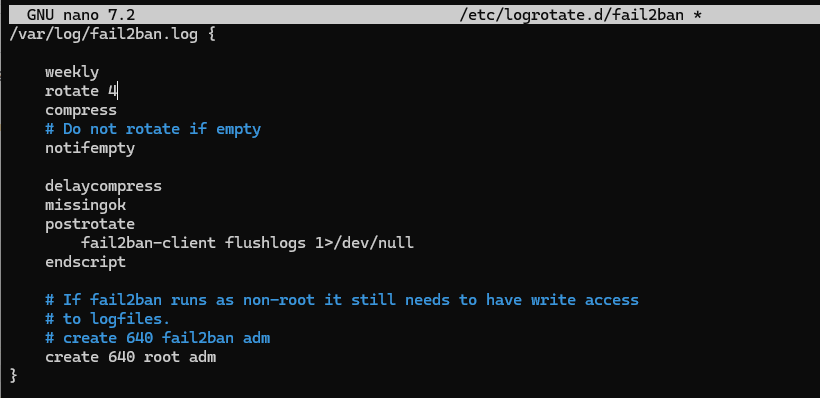
5. Understanding the configuration
One of the most important settings is rotate.
My original configuration contained:
rotate 4
Together with:
weekly
this meant that four weekly rotations were kept.
I decided to increase this to:
rotate 13
Since the logs are rotated weekly, this gives approximately 90 days of history.
This is useful when investigating an incident that may not be discovered immediately.
6. What I changed on my server
After checking the existing Logrotate configurations, I decided to increase the retention period of the most important security and system logs. For rsyslog, I changed rotate 4 to rotate 13. Because the logs are rotated weekly, this gives me approximately 90 days of history. I made the same change for Fail2Ban, increasing its retention from 4 to 13 weekly rotations. For Nginx, I changed the retention from 14 to 30 rotations while keeping daily rotation. This gives me approximately 30 days of Nginx access and error logs. My goal was to keep enough historical information to investigate unauthorized access, suspicious SSH activity, firewall events, Fail2Ban activity, system failures or other incidents that may not be discovered immediately.
7. Summary
Logrotate is an important tool for Linux system administration because it helps maintain historical logs in a controlled and predictable way. In this case, I increased the retention of important security and system logs from 4 to 13 weekly rotations, giving me approximately 90 days of history. I also configured Nginx logs to be retained for 30 days. The main reason for these changes was not disk space, but having enough historical information to investigate unauthorized access, suspicious activity, system failures and other incidents that may only be discovered after some time. Regularly reviewing and testing log retention is a simple but important part of maintaining a secure and reliable Linux server.
Thanks for your attention! I hope you made it this far and enjoyed the article. See you in the next one!